My School Ride: the bus tracking app for parents
Get the parent app on Google Play
Mornings with a school bus can be stressful. Is it late, or did we miss it? Should we wait at the corner or stay inside? Did she actually get on? My School Ride puts the answers on your phone, so you spend less time guessing and more time getting ready.
My School Ride is made by Satcop India Pvt. Ltd. of Pune. Schools fit a GPS device on each bus, and parents follow the ride in the app. Today it serves 200+ schools, 10,000+ buses and 200,000+ students across India.
What you see in the app
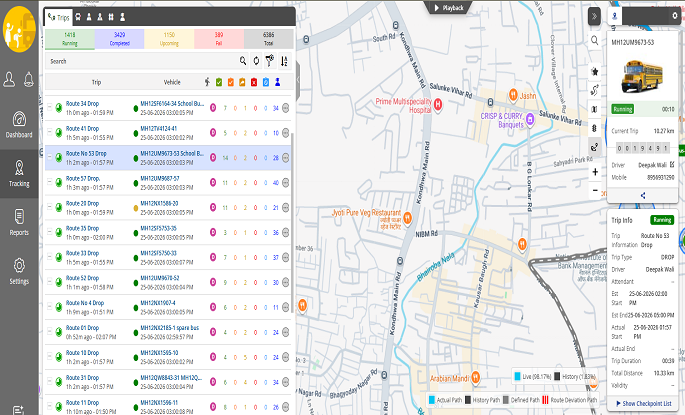
Your child's bus, live. Open the app and the bus appears on a map, moving as it drives. No calls to the driver or the school office.
For every feature in detail, see school bus app features: live map, ETA and alerts.
A heads-up before the bus arrives. The app sends an alert when the bus is getting close to your stop, so your child walks out at the right time instead of waiting on the road.

Boarding and drop messages. Where your school uses ID cards on the bus, you get a message when your child taps in and when they tap out, with the time.
More than one child? Siblings on different buses can be followed from one login.
Morning and afternoon trips. The app shows the pickup trip and the return trip, so the afternoon is as clear as the morning.
Safety, savings and service
These three words sum up why schools pick My School Ride, and they mean something specific for families.
- Safety: less time standing at roadside stops, and a record of when your child got on and off.
- Savings: of time, mostly. No more leaving home twenty minutes early "just in case".
- Service: a support team that schools can reach when something is not working, so problems get fixed at the source.
How to get started
- Your school must be on My School Ride. The app works for buses that carry the school's GPS device. If your school is not using it yet, share this page with the transport office.
- Get your login details from the school. Schools register parents' phone numbers when they set up routes.
- Install the app from Google Play, search "My School Ride", and sign in.
- Check your stop. Make sure the stop shown is the one your child uses. If not, tell the school so the alert comes at the right place.
A Hindi walk-through is on our blog: school bus kaise track kare.
Why a device on the bus beats a driver's phone
Some apps follow the driver's phone. When the driver changes, forgets to charge the phone or closes the app, the map goes blank. My School Ride uses a device fixed to the bus, powered by the bus, so the location keeps coming whoever is driving. Read the comparison on phone-based vs GPS device tracking.
Cameras on the bus
Some schools add a dashcam or cabin camera to their buses. Camera access is managed by the school, not shown to every parent. Learn more on school bus dashcam and in our dashcam guide.
Tips for a smooth first week
- Allow notifications for the app, or alerts will not appear.
- Keep mobile data or Wi-Fi on in the morning.
- If the alert feels too early or too late, tell the school; stop positions can be adjusted.
- Teach older children what the boarding message means, so they always tap their card.
What My School Ride does not do
We would rather set expectations clearly. The app does not replace the school's own communication about timings, holidays or route changes. It shows buses fitted with the school's device, so private vans or a parent's own car will not appear. And if the bus is in an area with no mobile signal, the map pauses until the signal returns; trip history fills in afterwards.
Privacy for families
Each parent sees only their own child's bus and messages. Phone numbers are registered by the school, and access ends when the school removes a family from transport. Drivers see their own trip and stop list, not parents' private details beyond what the school chooses to share.
Who makes My School Ride
My School Ride comes from Satcop India Pvt. Ltd., a Pune company that has designed and built GPS hardware since 2009. The same team makes the device on the bus and the app on your phone.
When the bus is running late
Delays happen: traffic, rain, a road closure. The app does not make the bus faster, but it shows you exactly where the bus is, so you can decide whether to wait at home a little longer. If the bus seems stuck for an unusually long time, call the school transport office; they can see the same map and will know the reason.
For schools reading this
If parents keep asking you for a bus tracking app, My School Ride covers GPS tracking, card attendance and cameras on one platform. Start with our school bus tracking system page, see RFID attendance on the bus, or browse cities we serve. Our offices are in Pune (Kharadi) and Hyderabad (Gachibowli); elsewhere, we serve and demo in your city.
Book a demo
Schools can book a demo by calling +91 86000 02222 or messaging WhatsApp +91 91560 88090 (wa.me/919156088090). Parents, please contact your school first for login help.
Frequently asked questions
Can I use My School Ride if my school does not use it?
No. The app shows buses fitted with the school's device. Ask your school to contact us.
How do I log in?
Use the phone number your school registered. If it does not work, check with the school office.
Why did I not get the near-stop alert?
Check that notifications are allowed and that your stop is correct in the app. The school can update the stop.
Can I track two children?
Yes, siblings can be followed from one login, even on different buses.
Does the app show when my child boards?
Yes, where the school uses ID cards on the bus. You get a message on tap-in and tap-out.
Is there a Hindi guide?
Yes, see our Hindi blog post on how to track the school bus.